SIGNAL ENGINE
PipFix Wizard
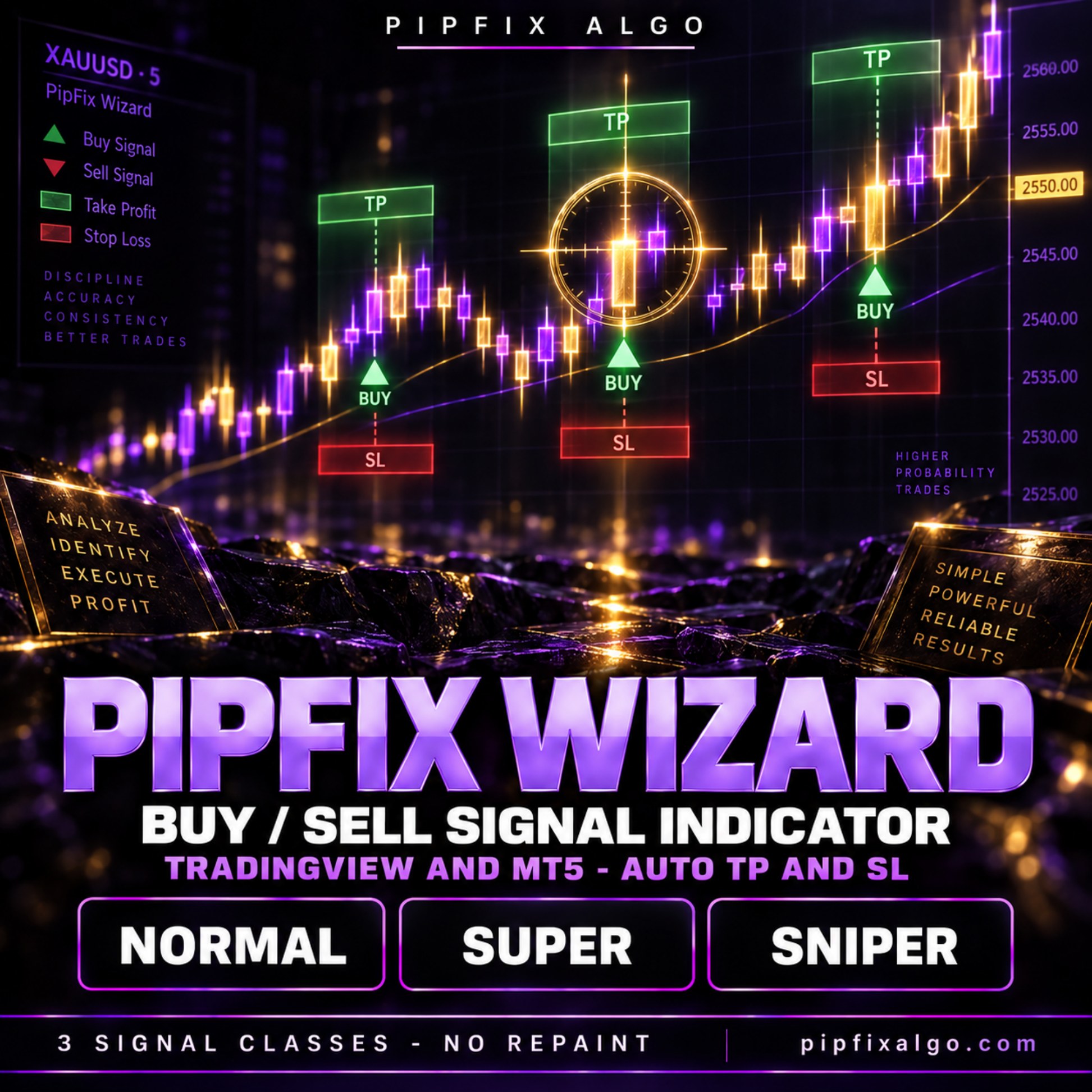
Buy and sell signals in three selectivity classes - Normal, Super and Sniper - each printed with its take profit and stop loss already drawn. For TradingView and MetaTrader 5.
See structure before you execute
PipFix TradingView Algo delivers clear market context, buy/sell signals and TP/SL guidance directly on your chart.
What you receive
- Invite-only TradingView access
- Setup and interpretation guide
- Activation support
- Product updates
Three engines, one chart
PipFix Wizard runs three independent signal engines at the same time. Each one is the same volatility-band logic set to a different level of selectivity, and each has its own colour, its own entry label and its own take-profit and stop-loss boxes, so there is never any doubt which engine produced a signal.
Normal (sensitivity 5): the most frequent. Reacts to ordinary swings.
Super (sensitivity 15): wider bands, fewer signals, larger moves.
Sniper (sensitivity 25): the most selective. Only major dislocations.
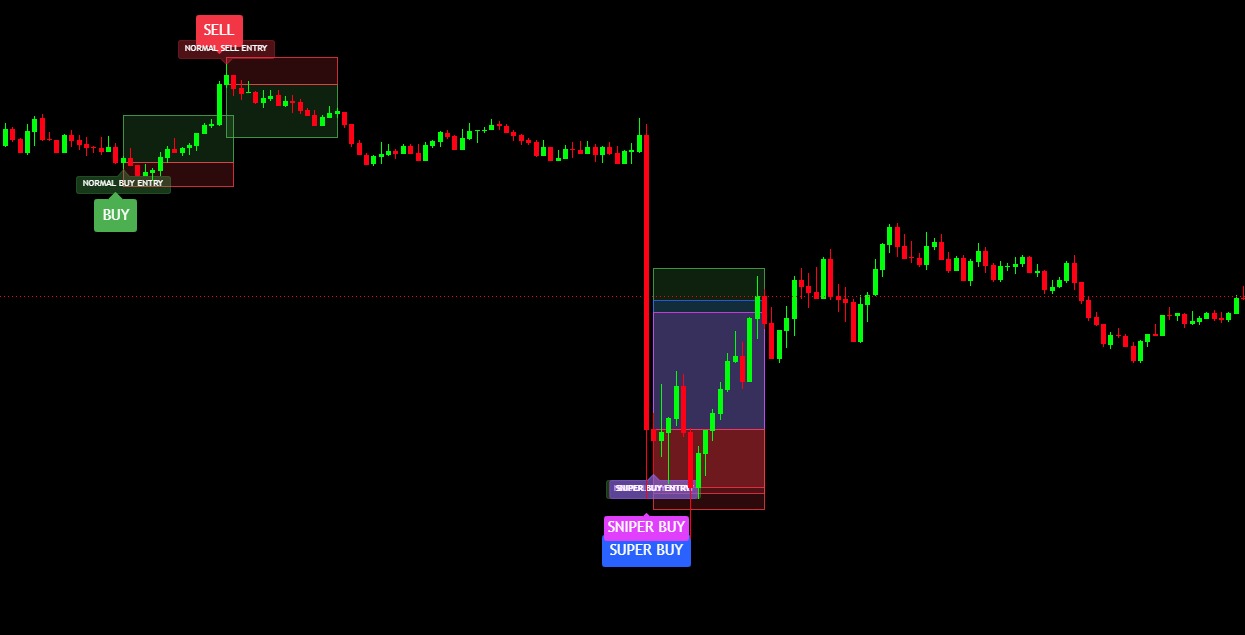
Run one on its own, or run all three and treat an overlap as a stronger read. In the chart here all three are switched on: a Normal sell and a Normal buy earlier in the session, then a drop where Sniper and Super both fire buys on the same candle, each with its own levels drawn.
Normal (sensitivity 5): the most frequent. Reacts to ordinary swings.
Super (sensitivity 15): wider bands, fewer signals, larger moves.
Sniper (sensitivity 25): the most selective. Only major dislocations.
Run one on its own, or run all three and treat an overlap as a stronger read. In the chart here all three are switched on: a Normal sell and a Normal buy earlier in the session, then a drop where Sniper and Super both fire buys on the same candle, each with its own levels drawn.
Every signal arrives complete
You are not left to work out the levels yourself. When a signal prints, the whole trade is already drawn on the chart:
Entry marker - BUY or SELL, with an entry label naming the engine that produced it.
Take-profit zone - shaded green, measured from the entry.
Stop-loss zone - shaded red, measured from the entry.
Automatic or manual levels - ATR distances that adapt to volatility, or fixed pips if you prefer to set them yourself.
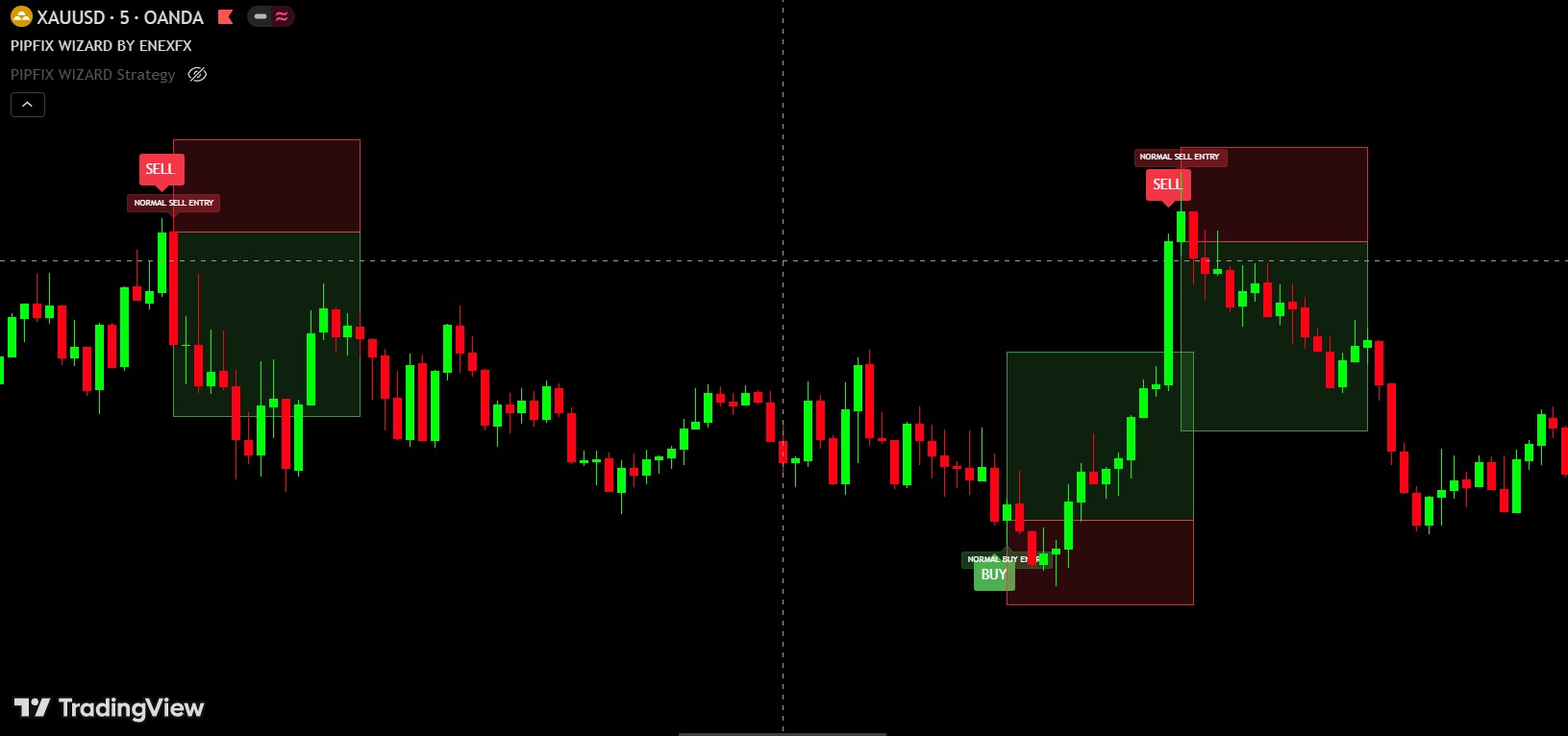
The chart here is the Normal engine alone on XAUUSD M5. You can see the whole trade, and its risk-to-reward, before you decide whether to take it.
Entry marker - BUY or SELL, with an entry label naming the engine that produced it.
Take-profit zone - shaded green, measured from the entry.
Stop-loss zone - shaded red, measured from the entry.
Automatic or manual levels - ATR distances that adapt to volatility, or fixed pips if you prefer to set them yourself.
The chart here is the Normal engine alone on XAUUSD M5. You can see the whole trade, and its risk-to-reward, before you decide whether to take it.
Super - when Normal and Super line up
Super uses much wider bands, so it fires far less often and its levels are proportionally larger. When Normal and Super print on the same move, you are seeing the ordinary swing signal and the wider-timeframe one agreeing.
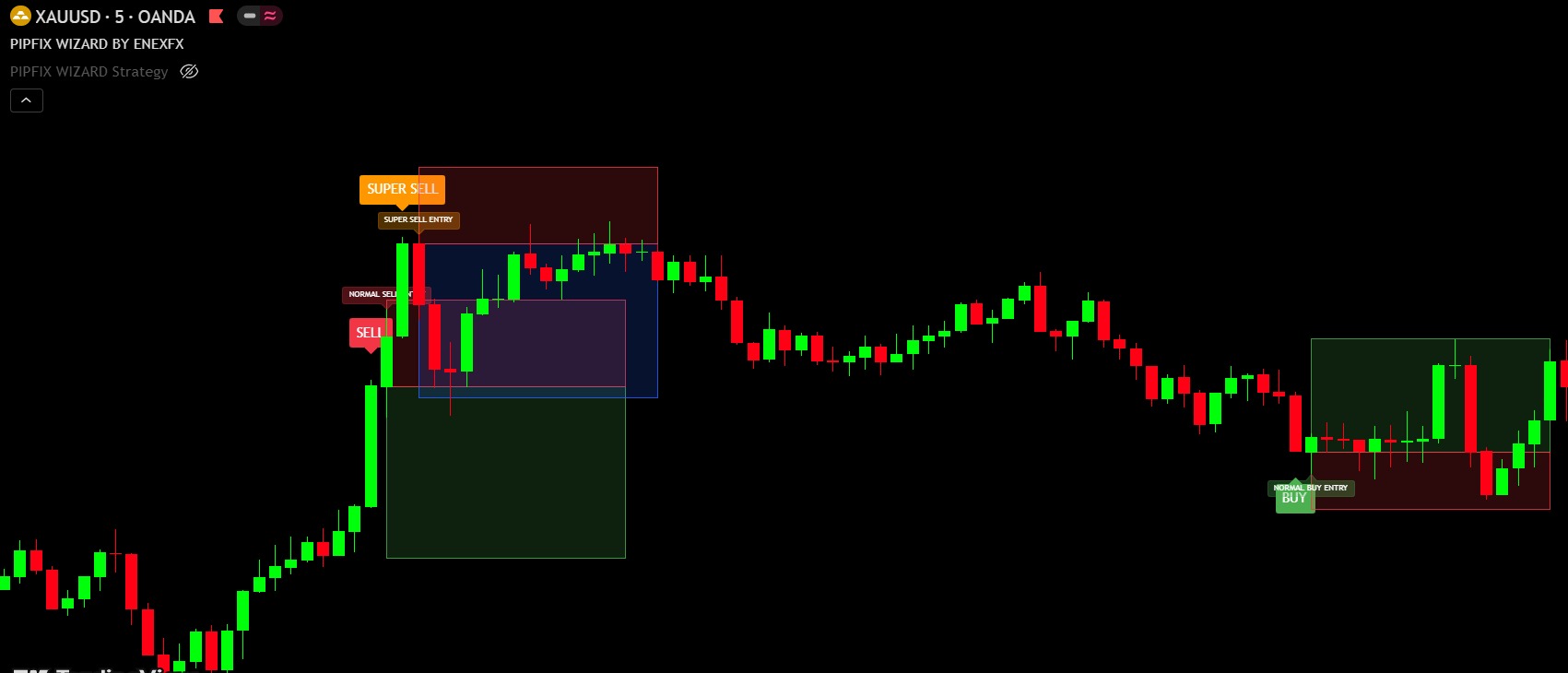
Here both sell at the top of the run, each with its own entry label and its own boxes - Super in amber, Normal in red - and you can read the two different targets straight off the chart.
Here both sell at the top of the run, each with its own entry label and its own boxes - Super in amber, Normal in red - and you can read the two different targets straight off the chart.
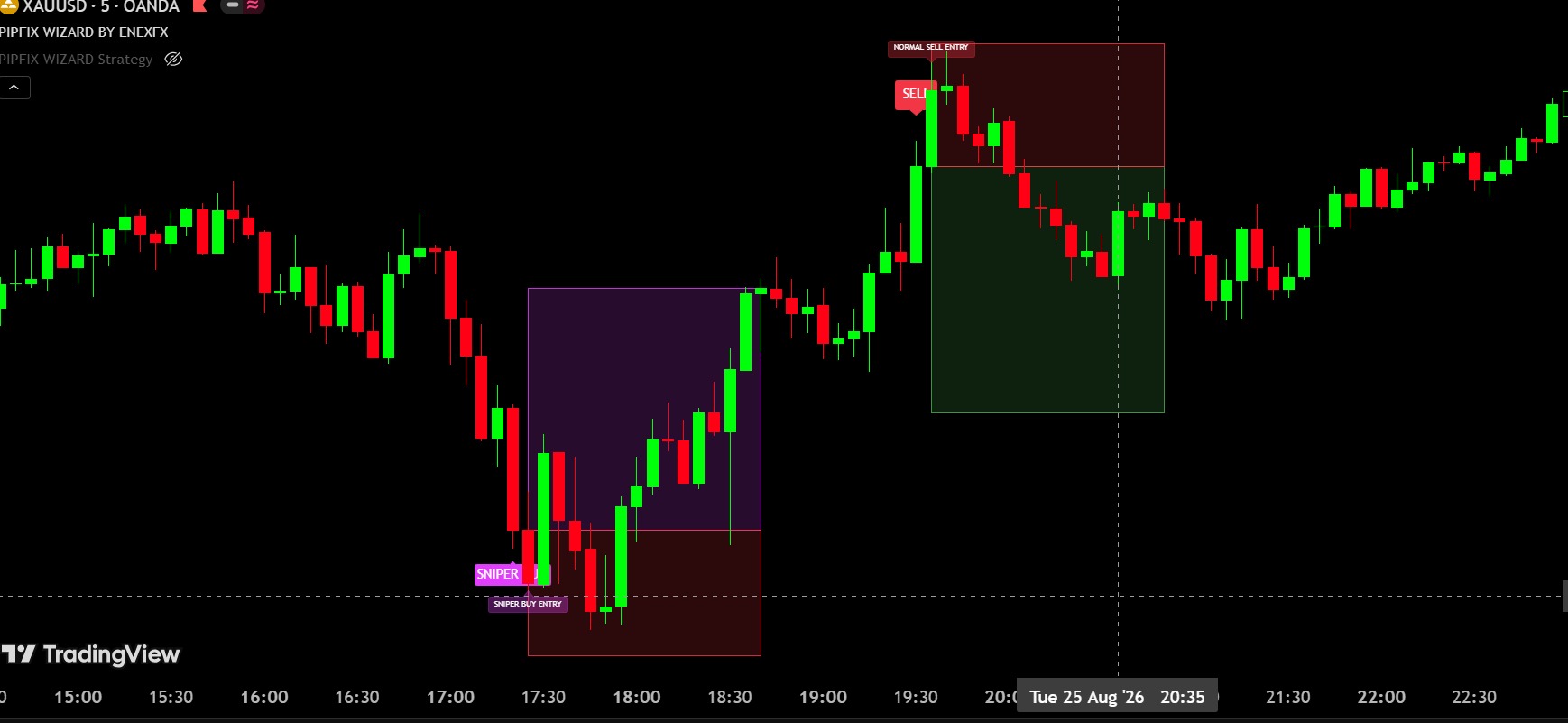
Sniper - only the dislocations
Sniper is the most selective of the three. On a normal session it prints nothing at all; it waits for price to stretch a long way from its own volatility before it marks anything.
In the chart here a Sniper buy is taken at the bottom of a sharp sell-off, with its target box in purple, and a separate Normal sell fires later on the same chart. Both are labelled, both carry their own levels, and neither interferes with the other.
In the chart here a Sniper buy is taken at the bottom of a sharp sell-off, with its target box in purple, and a separate Normal sell fires later on the same chart. Both are labelled, both carry their own levels, and neither interferes with the other.
Settings you control
Sensitivity: per engine, 0.5 to 30. The biggest lever on how often it fires.
Band method: Wilder ATR, or a true-range average.
Invert: flip the direction of any engine independently.
TP / SL mode: automatic (ATR multiples) or manual (fixed pips).
Confirmation bars: require a signal to hold for a number of bars before it prints.
Same-bar rule: choose whether the take profit or the stop loss counts first when a single bar touches both.
Alerts: on every engine - push, email or webhook.
Band method: Wilder ATR, or a true-range average.
Invert: flip the direction of any engine independently.
TP / SL mode: automatic (ATR multiples) or manual (fixed pips).
Confirmation bars: require a signal to hold for a number of bars before it prints.
Same-bar rule: choose whether the take profit or the stop loss counts first when a single bar touches both.
Alerts: on every engine - push, email or webhook.
Any market, any timeframe
The signal is built from volatility bands, so it scales to whatever you put it on - gold, FX, indices, crypto, M1 through Daily. Nothing is hard-coded to one instrument, and nothing needs re-tuning when you change chart.
You get it for TradingView and for MetaTrader 5, so the same signals appear on both platforms.
You get it for TradingView and for MetaTrader 5, so the same signals appear on both platforms.
Why we publish no win rate for this product
Because any single number would be misleading. The result depends entirely on which engine you use, which market, which timeframe, and which take-profit and stop-loss settings you choose. A win rate quoted for one combination tells you nothing about yours.
Put it on your own chart, on the market and timeframe you actually trade, and judge it there. If you want a system with a published, tested track record attached to it, that is what the MT5 Expert Advisor on this site is for.
Put it on your own chart, on the market and timeframe you actually trade, and judge it there. If you want a system with a published, tested track record attached to it, that is what the MT5 Expert Advisor on this site is for.
Honest notes
This is an indicator, not a robot. It marks levels on your chart. It will not place, manage or close a trade for you.
Signals confirm on bar close. A signal on a candle that is still forming can still disappear before that candle closes.
It does not predict. It measures how far price has moved relative to its own volatility and marks the turn. Like every indicator, it will be wrong sometimes - which is why every signal comes with a stop loss already drawn.
Signals confirm on bar close. A signal on a candle that is still forming can still disappear before that candle closes.
It does not predict. It measures how far price has moved relative to its own volatility and marks the turn. Like every indicator, it will be wrong sometimes - which is why every signal comes with a stop loss already drawn.
What you get
PipFix Wizard for TradingView and for MetaTrader 5.
All three signal engines - Normal, Super and Sniper.
Automatic take-profit and stop-loss boxes on every signal.
The full alert set - push, email and webhook.
A setup guide.
Free updates. One payment, no subscription.
TradingView access is granted to the username you enter at checkout, so make sure it is the account you actually use.
All three signal engines - Normal, Super and Sniper.
Automatic take-profit and stop-loss boxes on every signal.
The full alert set - push, email and webhook.
A setup guide.
Free updates. One payment, no subscription.
TradingView access is granted to the username you enter at checkout, so make sure it is the account you actually use.